
SASSA Status Check
Check your SASSA SRD R370 status through the official SASSA portal using your South African ID and registered cellphone number. to show payment dates, status messages, and what to do if your application is Pending or Declined.
Every month, millions of people type in the same two details and hope to see one word: Approved. Sassa status check is the fastest way to find out if your R370 is coming this month, what day it will land, and what to do if the answer is not the one you wanted. This SASSA SRD status check guide covers the whole process for the 2026/27 year. It shows you the official ways to check, the full Payment dates schedule, what each status message means, and the steps to take when your application was declined.
What is a SASSA status check?
a Sassa status check shows the result recorded for a particular application month. Depending on your record, it may display a pending, approved or declined result, a decline reason, or payment information. Approval and payment are different stages. An approved result does not mean that money has already reached your account.
its covers the special COVID-19 SRD grant. Other SASSA grants have separate application, review and payment arrangements.
SASSA September 2026 Payment Dates

What you need to check your status
For the South African ID-holder status form, have these details ready:
- Your 13-digit South African ID number.
- The cellphone number linked to your SRD application.
Check both numbers carefully before submitting. If you applied as an asylum seeker or special-permit holder, start from the official SRD homepage and choose the relevant application route.
How to Check Your SASSA SRD Status: Website, WhatsApp, USSD and Phone
You can check your SRD application online or contact SASSA for help. Before you start, keep your 13-digit South African ID number and the cellphone number used for your application ready.
The official website is the most direct place to check your monthly result. If you cannot use it, the contact options below can help you find the next step.
- 13-digit ID number
- Registered cellphone number
- Application reference
Follow these steps:
- Open the status page on your phone or computer.
- Enter your 13-digit South African ID number.
- Enter the 10-digit South African cellphone number used for your application.
- Check both numbers for typing mistakes.
- Select the submit button.
- Read the application information and monthly results displayed.
How to read your result
- Check the month first. Your application may have a different result for each month.
- “Application complete” is not a decision. Read the monthly result as well. A completed application does not, by itself, confirm approval or a payment date.
- If your application is declined, look for the reason displayed beside that month. For example, the message may say that another income source was identified.
- If a collection or payment field says “Not Selected”, ask SASSA whether you need to update anything. That field alone does not explain every payment delay.
Save the number in international format as +27 82 046 8553, or open the WhatsApp chat. This number appears in the Western Cape Government’s July 2026 SASSA contact guidance.
Getting started
- Open WhatsApp and start a chat with the government-listed number.
- Send Hi.
- Read the reply and select the relevant SRD service.
- Follow the current instructions shown in the chat.
- If a status-check option is available, select it and complete the requested verification.
What about 082 601 0111? Unverified
Some online guides describe 082 601 0111 as a “Sassa Status” service. Its current official status and exact menu have not been independently confirmed for this guide. Before entering your ID number or OTP there, confirm the number with SASSA on 0800 60 10 11.
Understanding the menu described in those guides
The reported process starts with:
… followed by a registered cellphone number, an OTP and an ID number. The reported menu contains:
| Option | Reported service |
|---|---|
| 1 | Application Status |
| 2 | Payment Status |
| 3 | Payment Date |
| 4 | Change Cellphone Number |
| 5 | Change Payment Method |
These menu numbers are a reference, not a verified live menu. Only follow them if SASSA has confirmed the service and the options on your screen match.
For a monthly result, the reported route is:
The range may group months into January–June and July–December. Read the outcome and any reason shown. If you want to check another month, follow the on-screen instructions; another verification step may be required.
If the service requests an OTP
Check the delivery instructions and your registered phone’s SMS inbox. Enter the code only in the official process you started. An unfamiliar sender number alone does not prove that a message is genuine.
Keep your details safe: Never give your OTP to someone offering to check your application for you, and never share your bank PIN.
USSD works through your phone’s dial pad rather than a website or app.
The code *134*7737# appears in older South African Government SRD guidance. The alternative *120*69277# also appears in older online guides, but its official status and current availability have not been confirmed here.
To try the previously published code
- Open your phone’s dial pad.
- Enter *134*7737#.
- Press the call button.
- If a menu opens, read the available options.
- Select the SRD or status option only if it is actually shown.
Some guides describe the sequence as 1 for SRD → 1 for Status → enter your 13-digit ID number. This sequence is unverified, so follow the live menu rather than entering these options automatically.
If you see “Service code not supported”
The USSD request has not worked. This message does not tell you whether your grant was approved or declined.
Use the official SRD status page or call 0800 60 10 11 instead. Current USSD availability has not been tested for this guide.
You may find older guides linking GovChat or SRD checks to 060 012 3456. However, the Department of Health lists this number for its health information WhatsApp service. See the Department of Health contact page.
Do not treat this number as a confirmed SASSA status-check channel.
If you see health information instead of a SASSA or SRD menu
Use one of these options:
There is no need to register for health alerts to check your SRD application through the official status website.
Call SASSA if you cannot understand a status message, need help with your application or want to confirm which service to use. The number is listed in the government contact guidance linked above.
Before calling, have these details ready
- Your 13-digit ID number.
- Your registered cellphone number.
- Your application reference, if available.
- The month you are asking about.
- The exact status or error message.
How to reach the right service
- Dial 0800 60 10 11.
- Listen to the language options.
- Select the option for SRD or grant enquiries.
- Follow the instructions to request assistance.
Some guides suggest 1 for English → 2 for SRD → 3 for an agent. This shortcut has not been verified here. Use it only if the recorded options match.
If your application was declined, ask the adviser to explain the reason and direct you to the official appeal process. If you need to follow up, ask whether an enquiry reference number is available.
If you cannot resolve your problem online or by phone, ask SASSA whether an office visit is needed.
This may be useful if you have lost access to your registered cellphone number, cannot complete an identity check or need help understanding a verification request.
Find the right office before travelling
Call 0800 60 10 11 and explain your problem. Ask for the nearest office, its opening hours and the documents needed for your case.
Documents and information to prepare
Depending on your problem, SASSA may ask for:
- Your green ID book or Smart ID card.
- A photocopy of your ID.
- Proof of residence, if required.
- Your old and new cellphone numbers.
- Your phone and relevant SIM card, if available.
- A bank confirmation letter, if the enquiry concerns your bank account.
- Your application reference and relevant SMS messages.
Confirm whether proof of residence must be dated within the last three months and whether a bank letter is needed before arranging these documents.
If your ID is lost, explain this when calling and ask what alternative documents are accepted. Office requirements and waiting times can vary.
Always confirm contact numbers, menu options and appeal steps with SASSA before you act on them. Details listed in older articles may be out of date.
SASSA payment dates 2026/27
Permanent grants are paid over three working days at the start of each month, always in the same order. Older Persons first, Disability second, then children’s and the rest. The SRD works differently. It is last in the queue and goes out in batches in the final week, once the income check for that month is done.
Table below shows the full schedule for this financial year. When a date falls on a weekend or public holiday, payment moves to the next working day.
| MONTH | OLDER PERSONS | DISABILITY | CHILDREN’S & OTHER | SRD R370 WINDOW | August 2026 | Tue 4 Aug | Wed 5 Aug | Thu 6 Aug | 24 to 31 Aug |
|---|---|---|---|---|
| September | Wed 2 Sep | Thu 3 Sep | Fri 4 Sep | 24 to 30 Sep |
| October | Fri 2 Oct | Mon 5 Oct | Tue 6 Oct | 26 to 30 Oct |
| November | Tue 3 Nov | Wed 4 Nov | Thu 5 Nov | 24 to 30 Nov |
| December | Wed 2 Dec | Thu 3 Dec | Fri 4 Dec | 23 to 30 Dec |
| January 2027 | Tue 5 Jan | Wed 6 Jan | Thu 7 Jan | 25 to 29 Jan |
| February | Tue 2 Feb | Wed 3 Feb | Thu 4 Feb | 22 to 26 Feb |
| March | Tue 2 Mar | Wed 3 Mar | Thu 4 Mar | 24 to 31 Mar |
Two notes on this month. Heritage Day falls on Thursday, 24 September 2026, which is the very first day of the SRD window. Banks and offices are closed that day, so the first batches will land from Friday 25 September instead. Because the holiday sits inside the payment window, give it one extra working day before you worry. Also remember that R370 batches only start in the last full week. That is why a status page checked in the middle of the month often shows an approved month with no pay date yet.
SASSA Payment Schedule 2026/2027: Older Persons, Disability and Children’s Grants
SASSA has announced its annual social grant payment schedule for the 2026/2027 financial year, covering April 2026 to March 2027. The calendar helps people receiving Older Persons, Disability and Children’s grants plan their monthly spending. You can find the announcement through the South African Government News Agency.
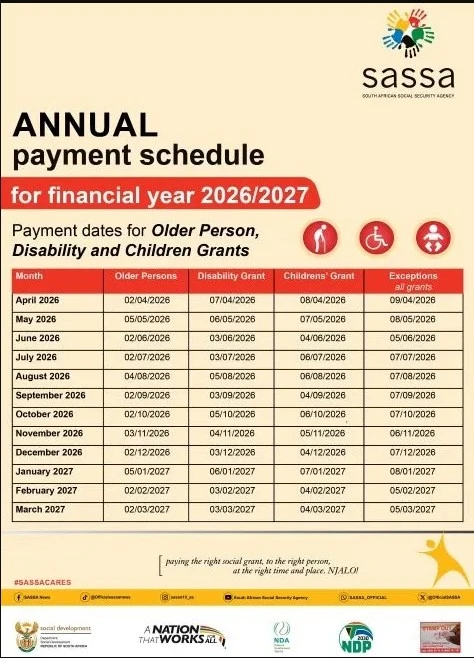
When checking the schedule, find the correct month and grant category. Use the published date for that month instead of assuming your grant will arrive on the same date every month.
How to Read the SASSA Payment Schedule
The schedule separates payments into three main groups:
- Older Persons grants: Find the date listed for older beneficiaries.
- Disability grants: Check the separate disability payment date.
- Children’s grants: Use the children’s payment date for the relevant grant.
Always read the actual calendar date. The first scheduled payment day should not be confused with the first working day of the month. Receiving Grant-in-Aid? This is an additional benefit paid with your qualifying main social grant. It is not a children’s grant. See the official Grant-in-Aid guidance for details.
What Does the Fourth Payment Day Mean?
A fourth payment day may apply to beneficiaries identified for a grant review. SASSA’s August 2026 notice specifically directed affected beneficiaries to this later payment day and asked them to complete the review process. See the official SASSA review notice.
Do not assume that every missing or unsuccessful payment will automatically arrive on the fourth day. If SASSA has sent you a review notice, follow the instructions in that notice and ask for help if anything is unclear.
Do You Have to Withdraw Your Grant on Payment Day?
No. Once the money reaches your account, you do not have to withdraw it immediately. SASSA explains that deposited funds remain available for you to access when needed. Read its official payment guidance. You can choose a convenient time to withdraw money or use the funds in your account. There is no need to join a queue simply because it is the scheduled payment day.
What to Do If Your SASSA Payment Is Missing
If your grant has not arrived, start with these checks:
- Confirm the date. Make sure you are looking at the correct month and grant category.
- Check your balance and transactions. Confirm whether the payment is missing or whether you are having trouble accessing money already deposited.
- Read any SASSA notices. Look for requests relating to a review, verification or updated information.
- Contact the relevant provider. Ask your bank or payment provider about account, card or withdrawal problems.
- Contact SASSA about the grant payment. Explain which month is missing and ask what action is needed.
Keep your ID number, grant details and any relevant messages ready when requesting help. Ask for a reference number so you can follow up on the enquiry. SASSA lists 0800 60 10 11 for enquiries in its official payment guidance.
Checking an SRD Application?
If you are looking for information about your SRD application, visit the official SRD portal. Do not use an Older Persons, Disability or Children’s grant date as confirmation of your individual SRD payment.
Your money does not disappear on the day it is sent. It stays in your account until you draw it. Money left uncollected for three months in a row is sent back.
What your SRD status means
| STATUS | MEANING AND NEXT STEP |
|---|---|
| Pending | A decision is not yet available for this month. Check whether information or verification is required. |
| Approved | Your application was approved for the selected month. Check for payment information or further instructions. |
| Declined | Read the reason. If you disagree, use the official appeal route promptly. |
| Referred | Contact SASSA for instructions about the additional checks required. |
| Bank details pending | Follow the official instructions to provide or correct payment details. This does not by itself confirm that payment is ready. |
| Identity verification failed | Check your identity details and follow the official verification instructions. |
| Application not found | Check the details entered and the application route used before taking further action. |
| Cancelled | Check the reason and follow the relevant official reinstatement or application instructions. |
Approved but no payment date or money?
First, check that you are viewing the correct month. An approved result does not mean the payment has already reached your account. Look for a payment date, banking verification message or another instruction. Make sure the payment details on your application are accurate.
If a payment date is shown, check your bank account or the payment channel linked to your application. Contact SASSA if the problem remains unresolved.
Avoid changing correct banking details repeatedly, because a new account may need verification. We cannot promise a payment within a fixed number of days.
Problems checking your SRD status
The checks in 2026 are stricter than in earlier years. These are the problems people run into most often, and what actually clears them.
| PROBLEM | WHAT TO DO |
|---|---|
| The website does not load | Check your connection and the website address, then try again later. |
| No matching record appears | Recheck your identity details and registered cellphone number. |
| Your result stays pending | Check for outstanding instructions. Do not change correct details just to trigger another check. |
| Banking details are rejected | Follow the official update instructions and contact your bank where necessary. |
| Identity verification fails | Follow the official verification instructions and ask SASSA for assistance if needed. |
Why was your SRD application declined?
Read the decline reason shown for the affected month. The decision may relate to financial information, identity verification or another eligibility requirement. Do not assume that every declined application has the same cause. If you believe the decision is incorrect, follow the official appeal instructions for that month.
Where to check SRD eligibility requirements
Eligibility depends on the rules applicable to your application and the information assessed by SASSA. Meeting one requirement does not guarantee approval. check our SRD grant guide and check the current requirements on the official SASSA website before applying.
How to appeal a declined SRD month
You have a legal right to appeal the SASSA decision. The SRD appeal process has two stages, it is free, you do not need a lawyer, and you get back pay for the months in question if you win.
Understand the Appeal Process
If you disagree with a declined SRD decision, read the reason and act promptly. SRD appeals are considered by the Independent Tribunal for Social Assistance Appeals.
Submit via the Official Portal
Start from the official SRD website and follow its appeal link. Read the current deadline and requirements, complete the requested verification and save your submission confirmation.
Appeal for Each Disputed Month
Submit an appeal for each declined month you wish to dispute. A new application does not challenge an earlier decline.
You can submit an appeal for one month without touching any other month. If you were declined for any period in the past, each month is treated on its own, so one bad month does not close your SRD file.
Do you need to apply again?
Check your existing application before starting a new one.
- If your result is pending, follow any outstanding instructions.
- If a month was declined and you disagree, use the appeal process.
- If your application was cancelled, follow the relevant reinstatement or application instructions.
Do not submit another application simply because a new month has started or a status lookup returned no result.
How to change your phone number or bank details
Use the update options on the official SRD website and follow the verification steps shown for your application.If you choose bank payment, provide accurate details for an account belonging to you.
If your registered cellphone number is no longer accessible, follow the official contact-recovery instructions or ask SASSA for assistance. Do not share your OTP, bank PIN or password with someone offering to change your details.
If you cannot get the OTP because the SIM is gone, the portal cannot help you. You will have to go to an office with your ID book. There is no way around this.
How much is the SRD grant?
The verified 2026 budget information retains the SRD grant at R370 per month and provides funding through 31 March 2027. Other SASSA grants have different payment amounts and eligibility requirements.
Source: Official budget reporting.
Where will you receive your SRD payment?
Follow the payment or collection instructions associated with your application. Your available options depend on the payment method recorded on your account. Do not travel to a collection point based only on an estimated date from an unofficial website.
How to check whether your money is available
Your SRD status and your bank balance are different. Check your balance through your bank or card issuer’s official app, ATM or customer-support service. Available services and fees depend on the provider. Never share your bank PIN or verification codes with someone offering to check your balance.
Never give your card PIN or an OTP to anyone who offers to check your balance for you. The agency and the banks do not need your PIN to pay you.
SASSA scams and how to stay safe
Be cautious of messages promising guaranteed approval, faster payments or a new grant in exchange for a fee. Verify announcements through SASSA or the Department of Social Development.
Enter a verification code only in the official service you intended to use. Never send an OTP, bank PIN or password to an individual offering help.
Do not publish your ID number, banking details or unredacted application screenshots in public comments.
How to contact SASSA
These are SASSA’s contact details, not the contact details of this website.
To report an error in this guide, use our Contact page. Do not send us an ID number, OTP or banking details.
Frequently asked questions
Does approved mean the money is in my account?
No. Check the payment information on your application and then your account or collection channel.
What if no result appears?
Check your identity details, registered cellphone number and application route. A missing result does not automatically mean your application was cancelled.
Can I help someone else check their status?
Help only with their permission. Let them handle verification codes and avoid saving or sharing their personal information.
Will checking more often speed up payment?
A status lookup does not request priority processing. Follow any action shown on your application.
Can this website approve my grant?
No. We publish information and links to official services. SASSA and the relevant appeal authority make decisions.
Independent information site. We are not SASSA. We do not take applications, keep your details, or pay out grants. Official channels only: srd.sassa.gov.za, 0800 60 10 11, and your nearest SASSA office.